
RFS - Real Flight Simulator
RORTOSSimulation
4.26.19K Reviews
- Version
- 3.2.8
- Installs
- 5.00M
- Age Rating
- Everyone
Screenshots


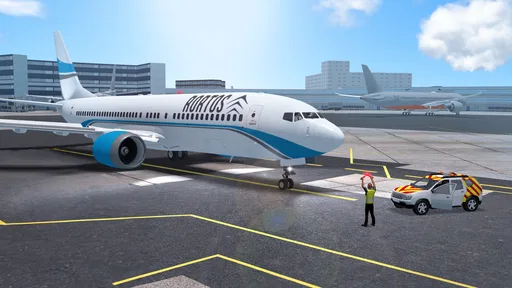





Our Review of RFS - Real Flight Simulator
 Analysis by Appyee
I like the idea of a flight simulator that can turn a spare moment at home into a chance to practice the rhythm of flying, rather than simply steer an aircraft around for a few minutes. RFS - Real Flight Simulator is aimed at that more involved kind of play: it is a mobile simulation game from RORTOS, and its appeal is strongest if you enjoy learning controls, planning a route through a flight, and paying attention to what is happening outside the cockpit. I would not choose it as a quick arcade game, but for an aviation-curious player who wants a more deliberate experience, it has a clear purpose.
Taking Off with RFS
The cost is worth understanding before you decide. RFS is listed at $0.99, so it is a paid game rather than a free download with an optional upgrade. It also includes in-app purchases priced from $3.99 to $39.99 per item. Those are separate from the initial purchase, so I would treat the entry price and any later spending as two distinct decisions, not assume the first payment unlocks everything. I would start with the base game and only consider an extra purchase after identifying a specific limitation in my own play.
That distinction matters because a flight simulator can be rewarding without being an ideal fit for everyone. If I want a game I can understand instantly and enjoy in short bursts, a simpler flying game is usually a better match. If I am curious about the process and happy to spend time getting comfortable with an aircraft, the small entry price makes it easier to try the simulation style without committing to a larger purchase up front. The app is rated for Everyone, which makes its content broadly accessible, though the controls and pace may still be more demanding than a casual player expects.
From the moment you launch RFS - Real Flight Simulator, you're greeted with a sleek interface that makes navigation a breeze. The app offers a wide range of aircraft to choose from, each meticulously detailed to mimic their real-world counterparts. You can start with something simple like a light aircraft and work your way up to commercial jets and even military planes. The variety is impressive, and there's something for everyone, whether you're a beginner or a seasoned pro.
What the Simulation Is Best At
The core value here is not simply seeing an aircraft in the air; it is having a mobile game that invites you to think about the whole flight. I find that distinction useful when comparing RFS with the usual alternatives in the simulation category. Arcade-style flying games tend to put instant movement and spectacle first. RFS is a better choice when I want the aircraft itself and the decisions around a flight to hold my attention. That extra involvement is also the trade-off: a relaxed scenic session can become a task if I am not in the mood to manage the experience.
Once you're in the cockpit, the magic really begins. The developers have done an extraordinary job of creating a realistic flight experience. You can control every aspect of the flight, from takeoff to landing. The controls are intuitive, but there's enough complexity to keep things interesting. Feel the thrill of soaring through the skies, managing fuel, navigating through different weather conditions, and communicating with ATC (Air Traffic Control) in real-time.
For a first session, I would resist the temptation to judge the game by how smoothly I can land immediately. I would pick a manageable aircraft, spend time learning how the controls respond, and make the landing the goal rather than rushing from takeoff to a complicated route. That gives me a clearer sense of whether the simulator’s pace suits me. It also makes each later flight more satisfying: I can focus on one improvement at a time, such as keeping a steadier approach, instead of trying to master every part of the cockpit in one go.
One practical way to enjoy the game is to decide what kind of session I have before starting. If I only have a short break, I would keep the plan simple and avoid turning it into a long practice exercise. If I have a quieter evening, I can take more time with a route and pay attention to the changing view. The simulator rewards patience more than frantic input, so a few purposeful attempts are likely to feel more useful than repeatedly restarting without noticing what went wrong.
One of the standout features is the global satellite imagery. Flying over different terrains and seeing the changing landscapes below is nothing short of breathtaking. Plus, the dynamic weather conditions add an extra layer of realism. Whether you're flying through a sunny day or battling a storm, the visuals are stunning.
Making Each Flight Work for You
The visual side is more than decoration for someone who enjoys looking out from the cockpit. It gives a flight a sense of place, and it can make a familiar route feel different when the scenery and conditions change. My advice is to balance sightseeing with the practical task of flying: it is tempting to watch the landscape, but a simulator is more engaging when I treat the view as part of the flight rather than the whole point of it. Players who mainly want a passive aerial tour may prefer a less hands-on experience.
Customization is a key part of the fun in RFS. You can tweak your aircraft to suit your preferences, from liveries to flight parameters. The attention to detail is fantastic, and it's clear the developers wanted to ensure each user could tailor their experience to their liking.
For players who like to experiment, customization can be a useful way to make a session feel personal without changing the basic reason to play. I would avoid changing several settings at once when learning, though. If a flight suddenly feels harder, it is much easier to understand the cause after adjusting one thing at a time. That small habit helps separate a control-learning problem from a configuration choice, and it keeps experimentation from becoming a frustrating guessing game.
The app also boasts a vibrant community. You can join multiplayer sessions and fly with friends, or even compete in real-time. It’s a great way to connect with fellow aviation enthusiasts and share your passion for flying. The community aspect adds a social element that keeps you coming back for more.
Multiplayer is most appealing when I already feel comfortable handling a flight on my own. It can make the game feel more social and give a session a shared purpose, but it is not the feature I would use to learn every control from scratch. I would first get familiar with the basics in a low-pressure solo session, then join others once I can give the flight my attention. That approach avoids making other players part of my tutorial and lets the social side enhance the experience rather than add pressure.
Who Gets the Most from the Price
RFS is a strong match for aviation fans, patient learners, and people who enjoy simulations where small decisions matter. It can also suit someone who wants a hobby-style game to return to, rather than a story campaign with a clear finish. The store shows an average rating of 4.2 from around 206,000 ratings, and the game has passed 5 million installs. Those figures suggest broad interest, but they do not guarantee that its hands-on pace will fit every player; I would use them as context, not as a substitute for knowing what kind of game I enjoy.
The game has been available since July 23, 2019, and its current version is 3.1.8. It requires Android 7.0 or later. I would check that requirement against my device before paying, especially if I keep an older phone or tablet around for games. The listed age rating is Everyone, but younger players may still need patience or help with the simulator controls. This is a game where the learning curve comes from its subject, not from mature content.
By contrast, I would skip it if I want instant action, a very simple control scheme, or a game that does not ask me to think about the flight once I am airborne. I would also be cautious if I am uncomfortable paying an entry price and then seeing optional in-app purchases. The listed purchase range is broad, and I would not spend more just because an item is available. The sensible test is whether the base experience already gives me the kind of flying session I wanted; if it does, there is no need to treat extra spending as part of the basic cost.
A realistic use case is a quiet evening when I have enough time to settle in but do not want to start a long console game. I can choose a straightforward flight, focus on takeoff and landing, and use the scenery as a change of pace between the more demanding parts. On another day, I might use the game to practice a particular part of the experience instead of trying to make every flight elaborate. This flexibility is a better reason to return than simply collecting aircraft or chasing a perfect run.
Landing the Verdict
So, is RFS - Real Flight Simulator worth your time? Absolutely. It's not just a game; it’s an experience. The combination of realistic controls, stunning visuals, and an active community makes it a standout in the realm of mobile simulators. Sure, there are a few in-app purchases, but the base game offers plenty to keep you entertained without spending a dime.
Whether you want to relax and enjoy the scenery or challenge yourself with complex maneuvers, RFS provides a platform for both. So, buckle up, start those engines, and take to the skies. You won't regret it!
My recommendation comes with one important qualification: I would buy it for the simulation, not for a promise of effortless entertainment. The game’s strengths are most apparent when I am willing to learn, plan a little, and accept that a flight may take concentration. The landscape and multiplayer options add variety, but they do not remove that central commitment. If I want a casual flying toy, I would choose something lighter; if I want a mobile flight simulator I can approach at my own pace, RFS makes a compelling case.
Overall, the price is easy to evaluate as a starting point, while the optional purchases deserve a more personal decision. I would install it only if my device meets the requirement and I am genuinely interested in aircraft handling. For that audience, the combination of a hands-on cockpit, varied scenery, customization, and shared sessions offers meaningful replay value. For everyone else, the same depth can feel like friction. That is why I see RFS as a worthwhile, focused simulation rather than a universal pick for mobile gaming.
Verdict
Strengths of RFS - Real Flight Simulator
- Highly realistic flight dynamics.
- Wide range of aircraft to choose from.
- Detailed global maps and airports.
- Customizable weather conditions.
- Engaging multiplayer mode.
Limitations of RFS - Real Flight Simulator
- Requires a high-performance device.
- Some features require in-app purchases.
- Complex controls may deter beginners.
- Occasional connectivity issues.
- Limited offline functionality.
Other Releases by RORTOS
View All
Wings of Heroes: Flying Games
Simulation4.3
Similar Picks in This Category
View All
Truckers of Europe 3
Wanda Software4.3

Town Building Life Simulator
XGame Global4.2

Fidget Toys Trading・Pop It 3D
Freeplay Inc4.7

Sculpt People
CrazyLabs LTD4.4

Scary Teacher 3D
Z & K Games4.2

Hair Tattoo: Barber Shop Game
CASUAL AZUR GAMES4.3
Frequently Asked Questions
What is RFS - Real Flight Simulator?
RFS - Real Flight Simulator is an immersive flight simulation app that allows users to experience the thrill of flying a wide range of aircraft. With realistic flight physics, detailed cockpits, and global navigation, it caters to both aviation enthusiasts and casual gamers. The app is available on both Android and iOS platforms.
Is RFS - Real Flight Simulator free to download and play?
RFS offers a free version with limited features, allowing users to explore basic flight simulation. However, for a more comprehensive experience, including access to all aircraft and advanced features, users can opt for a premium subscription. This model ensures that players can try before they buy, deciding if the full version is worth the investment.
What are the key features of RFS - Real Flight Simulator?
RFS boasts a variety of features, including real-time flights, multiplayer modes, and realistic weather conditions. Users can manage flight plans, navigate using real-time air traffic control, and enjoy detailed 3D graphics. The app also offers customizable liveries and a wide selection of aircraft, enhancing the overall simulation experience.
What devices are compatible with RFS - Real Flight Simulator?
RFS is designed for both Android and iOS devices, ensuring broad accessibility. It's important for users to check the specific OS version requirements on the app store to ensure compatibility. Generally, mid to high-end devices provide the best performance, given the app's detailed graphics and extensive features.
Does RFS - Real Flight Simulator require an internet connection?
While RFS can be played offline for basic flight experiences, an internet connection is necessary for accessing features like real-time multiplayer, flight updates, and downloading additional content. Online connectivity enriches the gameplay by allowing users to interact with a global community of flight enthusiasts.
Play our best games!


